How I Built a Proxy on CranL in 30 Minutes
You're sitting in a hotel in Europe. You open your browser, navigate to your bank back home, and get a blank page. Access denied. Your IP says you're in Germany, so the site says you're not welcome. You could pay for a VPN. You'd use it twice a month, and half of them sell your data or are owned by companies you'd rather not trust ✡ . You could also spin up a VPS. Now you're managing a server for a browser tab. Both options feel wrong for what should be a simple problem.
My requirements weren't much. Servers in the MENA region and I don't want to manage the underlying infrastructure myself. Turns out almost nothing out there meets both criteria, till I found CranL a couple of weeks ago. It's a PaaS that lets you deploy Docker containers with a subdomain, HTTPS, and a CDN in front. Half an hour later, I had turned it into a working proxy exiting from whatever MENA region I wanted.
What Geoblocking Actually Is
Every device on the internet gets an IP address from its ISP. That IP tells every service exactly where you are. Not your street address, but your country and region.
Services maintain lists of allowed IP ranges. If your IP isn't in the right pool, you're blocked. It doesn't matter who you are. It doesn't matter that you have an account. Your IP is wrong, so the door is closed.
That's geoblocking. Copyright licensing, operational costs, regulatory compliance, whatever the reason, the result is the same: your location decides what you can access.
Why MENA Makes This Harder
Most VPN and proxy providers give you the same five locations. US, Germany, Netherlands, UK, maybe Singapore. Want an IP that exits from the Middle East? Your options are thin, expensive, or unreliable.
CranL shines here because it has servers in Saudi Arabia, Egypt, Turkey, UAE!
That matters. Arabic sites with region-locked video, local streaming platforms, government portals that check your country, banking apps that flag foreign logins. All of these need a regional IP. If you're Egyptian living in Europe and your bank's portal flags your German IP, a US VPN exit doesn't help. You need an Egyptian exit.
Same for Turkey. There's a huge amount of locally available Turkish content that simply doesn't load from a European IP. Pick a Turkey server and that problem goes away.
For anyone living abroad who wants to stay connected to regional services back home, this is the gap that usually requires expensive VPNs that charge you money for using the service and then sell your data or are owned by some Israeli company.
Why Proxying on a PaaS Is Hard and What Makes CranL Unique
This is where most people would stop reading and start thinking. Push a VPN or a proxy server to CranL, point your browser at it, done. Right?
Not even close. PaaS platforms weren't built for this. They're built for web apps. And they fight you at every layer.
Every PaaS puts a CDN in front of your app. CranL itself uses BunnyCDN. That CDN is an HTTP reverse proxy itself which terminates your connection, talks HTTP to your container, and sends back the response. Normal web traffic works perfectly. Proxy traffic doesn't.
When your browser wants to reach an HTTPS site through a proxy, it doesn't send a normal request. It sends something called a CONNECT request. That's your browser saying "I need you to open a raw TCP tunnel to this destination." The proxy obliges. It connects to the destination, and from that point forward, it just passes encrypted bytes back and forth between your browser and the server. It never reads the content. It doesn't need to. It's just a pipe.
Here's the problem: a CDN doesn't do pipes. A CDN speaks HTTP. It expects to receive a request, process it, and return a response. That's what it was built for. Send a CONNECT to BunnyCDN and the request never reaches your container. The CDN doesn't understand it, doesn't forward it, and kills it at the edge.
Even if you got past that somehow, PaaS platforms spin down idle containers to save resources. Your proxy goes to sleep. Your tunnel dies. The next request wakes it back up, but there's a cold start delay and whatever connection you had is gone. You're reconnecting constantly.
Then there's the CDN's rate limits. Proxy traffic is chatty. A single browser tab can fire dozens of requests in seconds. Hit the limit and your traffic gets 429'd. CDNs also cap response sizes. Stream a large file through your proxy and the CDN cuts you off mid-transfer. No warning, no graceful close. Just gone.
And every byte your browser downloads also counts as egress from the container. Most PaaS platforms meter and cap traffic. Proxy traffic adds up fast. But luckily, CranL promises unlimited bandwidth.
Real talk: if you tried to deploy a traditional forward proxy on any PaaS, you'd hit most of these walls on day one. The platform isn't working against you on purpose. It just wasn't designed for this.
But there's one transport most CDNs need to forward. And that changes everything.
WebSocket
CDNs forward WebSocket connections. They have to. Every modern app uses WebSockets for real-time features: chat, live dashboards, collaborative editing. A CDN that blocks WebSocket upgrades is a CDN nobody uses.
BunnyCDN is no exception.
I sent a WebSocket upgrade request to a container on CranL:
curl -i \
  -H "Connection: Upgrade" \
  -H "Upgrade: websocket" \
  -H "Sec-WebSocket-Key: dGhlIHdsdfdsfdsds==" \
  -H "Sec-WebSocket-Version: 13" \
  https://my-app.cranl.net/
HTTP/2 301
via: 1.1 a94f07c67142 (tinyproxy/1.11.2)
cdn-requestpullsuccess: True
cdn-requestpullcode: 301
That via header came from inside my container, which means BunnyCDN forwarded the WebSocket upgrade all the way through to the app.
I also tested sending an HTTP CONNECT request and found it blocked as expected, but WebSocket passes through. Those two facts make the rest of this post work.
Chisel: TCP Over WebSocket
Chisel is a TCP tunneling tool that uses WebSocket as its transport layer.
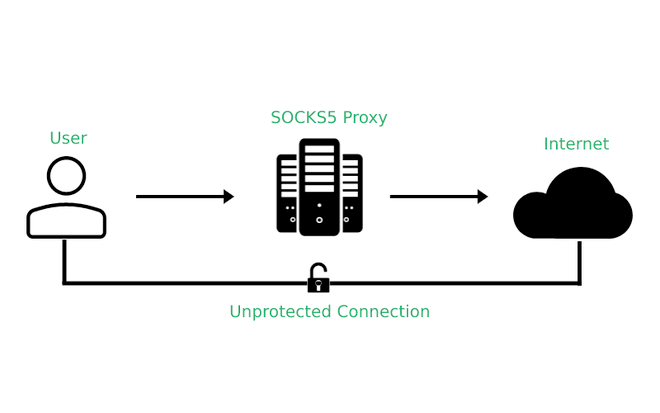
Here's the plan: you run the Chisel server inside your container on CranL. On your laptop, you run the Chisel client. The client opens a local SOCKS5 proxy that your browser can talk to. But wait, SOCKS5? What's that? Well... SOCKS5 is a protocol that lets you route any TCP traffic through a proxy, not just web requests. It works at a lower level than an HTTP proxy, so it handles HTTPS, FTP, whatever you throw at it.
When you visit a site, your browser sends traffic to that local proxy. The client takes it, wraps it inside a WebSocket connection, and sends it to the Chisel server on CranL. The server unwraps it and makes the actual outbound request to whatever site you're trying to reach. The response travels back the same way.
From the CDN's perspective, it's just a normal WebSocket connection. It doesn't know there's TCP traffic inside. It doesn't care.
The Setup
Lucky us, CranL supports Dockerfiles. So push one, get a subdomain with HTTPS and a CDN in front in a matter of minutes.
The Dockerfile
FROM alpine:3.19

RUN apk add --no-cache curl && \
    ARCH=$(uname -m | sed 's/x86_64/amd64/;s/aarch64/arm64/') && \
    curl -fsSL "https://github.com/jpillora/chisel/releases/download/v1.10.0/chisel_1.10.0_linux_${ARCH}.gz" \
      | gunzip > /usr/local/bin/chisel && \
    chmod +x /usr/local/bin/chisel

EXPOSE 8888

CMD ["chisel", "server", "--port", "8888", "--socks5"]
This downloads Chisel, runs it in SOCKS5 mode on port 8888. That's literally all we need. Now push to CranL.
On Your Machine
Install Chisel locally, then connect:
chisel client https://your-app.cranl.net socks
After this: a SOCKS5 proxy opens on localhost:1080. In Firefox, go to Settings, search for proxy, select manual configuration, set SOCKS5 to 127.0.0.1 port 1080, and check "Proxy DNS when using SOCKS v5." Clear the HTTP and SSL proxy fields.
Verify it works:
curl --socks5 localhost:1080 https://ifconfig.me
# 45.141.57.137
That's the CranL server's IP. Traffic is routing through.
Run the client when you need it, kill it when you don't. The CranL app idles in between.
If you plan to keep this running for more than a session, add auth. Without it, anyone who finds your subdomain can use your proxy. Add --auth user:password to the server CMD in the Dockerfile and --auth user:password to the client command. Redeploy and you are protected.
This is a proxy, not a VPN.
So it only tunnels the traffic you explicitly route through it. Apps outside your browser won't use it unless you configure them for SOCKS5. Also, WebSocket connections through a CDN can be slower than a direct VPS. You're adding an extra hop. For browsing and streaming, you won't notice. For latency-sensitive work, you might.
This also doesn't make you anonymous. Your CranL account is tied to you. The proxy server can see your traffic destinations. This is for accessing geo-restricted services, not for hiding.
What I love about this setup, even though I'm a server guy, is that there's no server to manage. No overpriced subscription. One Dockerfile, one client command, done.
One More Thing
While exploring CranL, I found something that makes this even easier. CranL just released a CLI tool that lets you deploy to the cloud using a single prompt. It also comes with MCP support, which means you can hook it into your AI tools and have them handle the entire setup for you.
Install the CLI:
curl -fsSL https://cranl.com/install.sh | bash
Then log in:
cranl login
Now here's where it gets interesting. CranL has an MCP server, so you can connect it to Claude Code, Cursor, or whatever AI tool you use. Run cranl mcp and it gives you the config with your API key already populated. Paste it into your IDE's MCP settings and you're connected.
After that, you can literally tell your AI assistant: "Deploy a Chisel SOCKS5 proxy to CranL on the Egypt server with auth credentials." It creates the app, pushes the Dockerfile, and deploys it. No manual steps.
So instead of writing the Dockerfile yourself, pushing it, and configuring everything manually, you could let your AI assistant do the whole thing in one shot.